
Hi ! Today we will see the solution of one of the main problems faced by bloggers while they post on their blogs. Yes, it's the privacy set-up for bloggers i.e the author name and date-time settings. Many bloggers earn revenue with blogs which are entertainment or another content where the author doesn't want his/her name on the blog. Also, due to some reasons, bloggers also don't want their posts date & time to be showed.So, let's see how to remove the name of author and date-time of blogs posts.
The Simplest way to remove the author name and date & time from blog's posts is that you should follow the following steps:
1] Go to your blogger dashboard.
2] Click on Layout > Blog Posts> EDIT.
After Clicking on Blogs Posts edit, a window will appear with options like as follows,
The Simplest way to remove the author name and date & time from blog's posts is that you should follow the following steps:
1] Go to your blogger dashboard.
2] Click on Layout > Blog Posts> EDIT.
After Clicking on Blogs Posts edit, a window will appear with options like as follows,
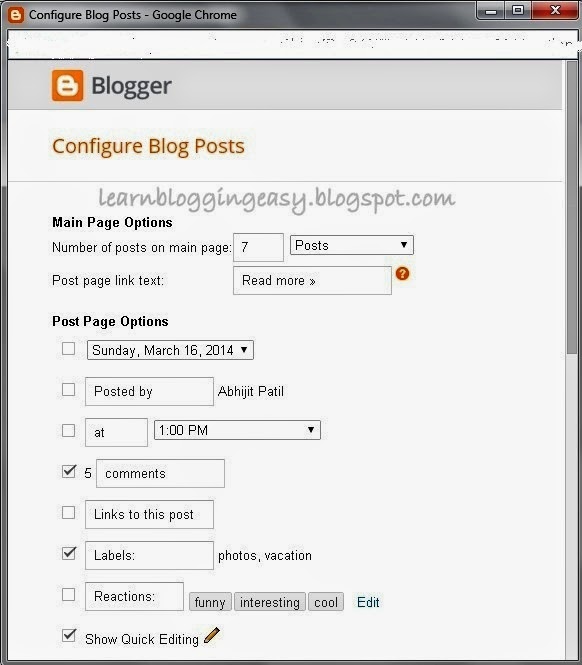 |
| Blog Posts 'EDIT' Options |
As you can see, I have removed all the options as 'posted by' and 'posted at' with 'posted on' which will remove the author's name from blogs posts with date-time too.
Another method to remove author's name and blog's date and time is to remove it by editing your HTML template.
..........................................................................................................................................
Find for "<span class='post-author vcard'>"
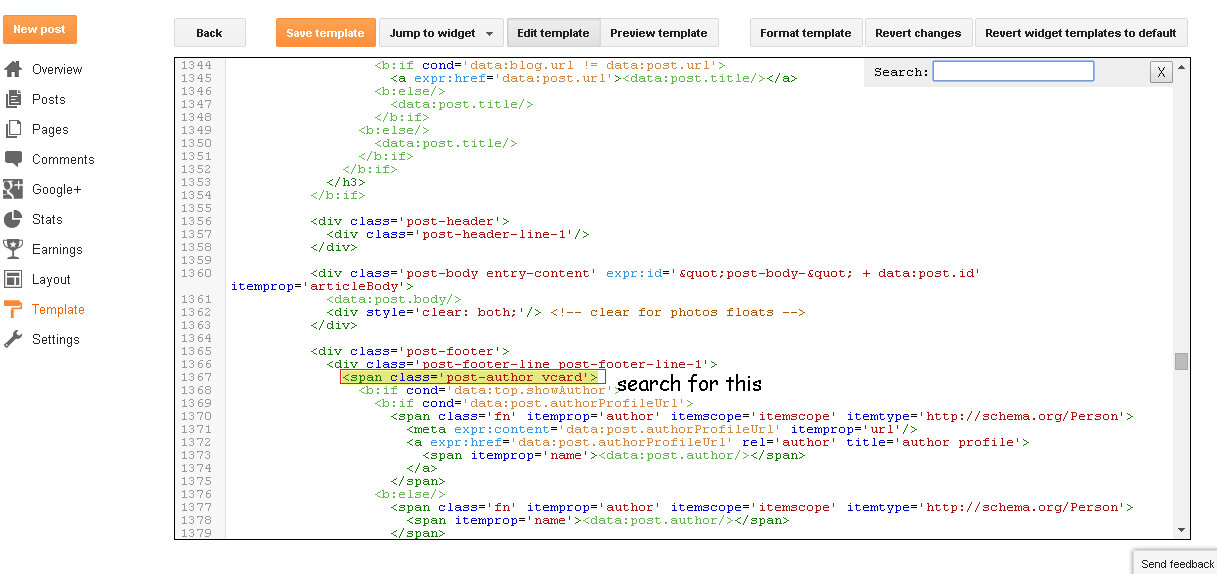 |
| Open this image in new tab, to view in good HD resolution |
............................................................................................................................................
<span class='post-author vcard'>
<b:if cond='data:top.showAuthor'>
<b:if cond='data:post.authorProfileUrl'>
<span class='fn' itemprop='author' itemscope='itemscope' itemtype='http://schema.org/Person'>
<meta expr:content='data:post.authorProfileUrl' itemprop='url'/>
<a expr:href='data:post.authorProfileUrl' rel='author' title='author profile'>
<span itemprop='name'><data:post.author/></span>
</a>
</span>
<b:else/>
<span class='fn' itemprop='author' itemscope='itemscope' itemtype='http://schema.org/Person'>
<span itemprop='name'><data:post.author/></span>
</span>
</b:if>
</b:if>
</span>
<span class='post-timestamp'>
<b:if cond='data:top.showTimestamp'>
<data:top.timestampLabel/>
<b:if cond='data:post.url'>
<meta expr:content='data:post.canonicalUrl' itemprop='url'/>
<a class='timestamp-link' expr:href='data:post.url' rel='bookmark' title='permanent link'><abbr class='published' expr:title='data:post.timestampISO8601' itemprop='datePublished'><data:post.timestamp/></abbr></a>
</b:if>
</b:if>
</span>
............................................................................................................................
Read Carefully, you just need to add the following codes before and after the bolded reddish line named <span=''> and </span>.
<b:if cond='data:blog.url != "URL OF Selected Post"'>
<span class='post-author vcard'>
<b:if cond='data:top.showAuthor'>
<b:if cond='data:post.authorProfileUrl'>
<span class='fn' itemprop='author' itemscope='itemscope' itemtype='http://schema.org/Person'>
<meta expr:content='data:post.authorProfileUrl' itemprop='url'/>
<a expr:href='data:post.authorProfileUrl' rel='author' title='author profile'>
<span itemprop='name'><data:post.author/></span>
</a>
</span>
<b:else/>
<span class='fn' itemprop='author' itemscope='itemscope' itemtype='http://schema.org/Person'>
<span itemprop='name'><data:post.author/></span>
</span>
</b:if>
</b:if>
</span>
<span class='post-timestamp'>
<b:if cond='data:top.showTimestamp'>
<data:top.timestampLabel/>
<b:if cond='data:post.url'>
<meta expr:content='data:post.canonicalUrl' itemprop='url'/>
<a class='timestamp-link' expr:href='data:post.url' rel='bookmark' title='permanent link'><abbr class='published' expr:title='data:post.timestampISO8601' itemprop='datePublished'><data:post.timestamp/></abbr></a>
</b:if>
</b:if>
</span>
</b:if>
............................................................................................................................
Now, You are all done! Enjoy blogging! If you still face any problems or have any queries feel free to comment.
............................................................................................................................
No comments:
Post a Comment
COMMENT POLICY: We’re pleased to see your comment here. However, Please Keep in mind that all comments are moderated manually by humans according to our comment policy. Using Keywords and links to your blogs or websites in the name field area is forbidden. Let’s enjoy a personal and meaningful conversation. Do not break the rules of comment policy.